Upgrading from the free version of Coursebox to a paid plan unlocks advanced features such as AI video generation, certificates, SCORM export, branded themes, and deeper analytics—giving you more control and customisation for your learning experience.
You can upgrade in the following two ways:
Through your Coursebox Home Page
To upgrade your plan, simply access your account and click the "Upgrade" button on the right side of the top bar.

A popup with the different plans will appear. Just select the plan that suits you and follow the steps. Alternatively, choose your pricing plan from the pricing page on our website, ensuring that the email address you enter is the same as the email address of your account.
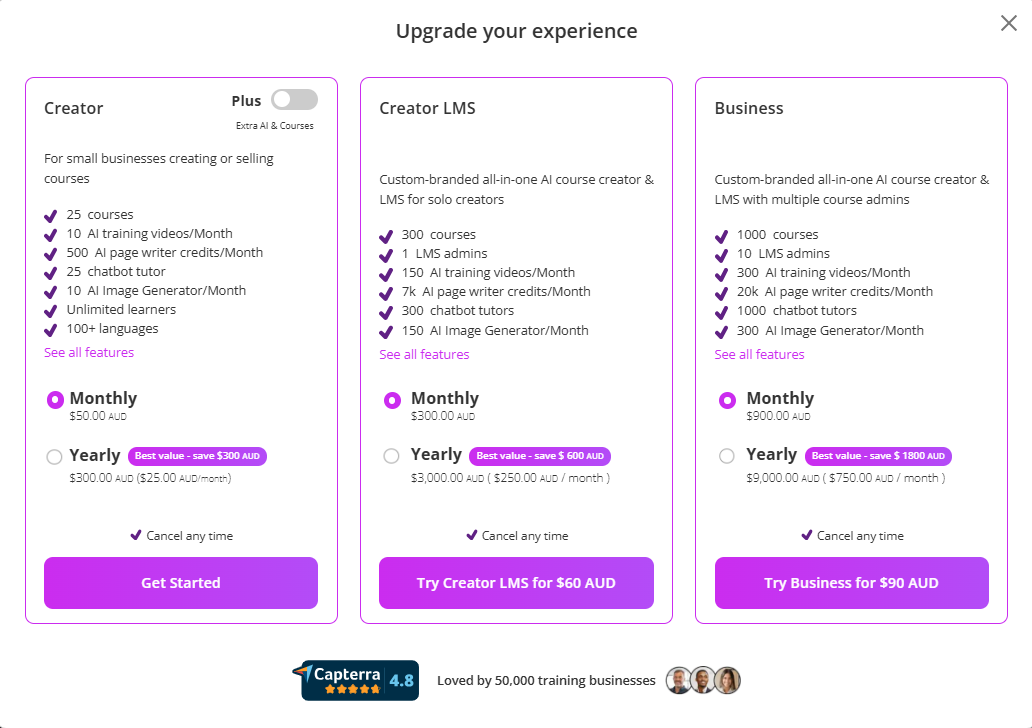
Through Coursebox Pricing Page
Go to the official Coursebox pricing page:
https://www.coursebox.ai/pricingReview the available plans and select the one that best suits your needs (e.g., Creator, Plus, or Branded Platform).
Click “Get Started” or “Upgrade” on your preferred plan.
Follow the prompts to sign in (if you're not already) and complete your payment setup.
Once upgraded, new features will be immediately available in your dashboard based on your plan. You can manage your subscription or change plans anytime through your account settings.
For more information go to: Account Access, Management & Subscription
Was this article helpful?
That’s Great!
Thank you for your feedback
Sorry! We couldn't be helpful
Thank you for your feedback
Feedback sent
We appreciate your effort and will try to fix the article