Yes. Integration can be done via SCORM or LTI (depending on Workday configuration). API integration is also available for more advanced workflows.
To see how to do it follow the steps in this article Course Publishing & Exporting.
Export a Course to SCORM 1.2 and 2004
Coursebox enables experts to export courses as in SCORM format, including 1.2 or 2004.
When you export a Coursebox course as SCORM, you’re packaging your Coursebox pages, media, and completion logic into a standard zip that any SCORM-compliant LMS can play. The learning experience is still powered by Coursebox—the player, navigation, and tracking behaviours come from Coursebox’s authoring and runtime—just delivered through your LMS.
Key things to know:
- Edits after export: If you update the course in Coursebox, you’ll need to re-export and upload the new SCORM package into your LMS.
- Branding: Your Coursebox styling and layout remain intact.
- Tracking: Choose SCORM 1.2 (widely supported for completion/score) or SCORM 2004 (v3/v4) for advanced sequencing and bookmarking.
Export to SCORM
On the publish settings page, publish your course and click the share button to then select the version of SCORM required for upload to your LMS.
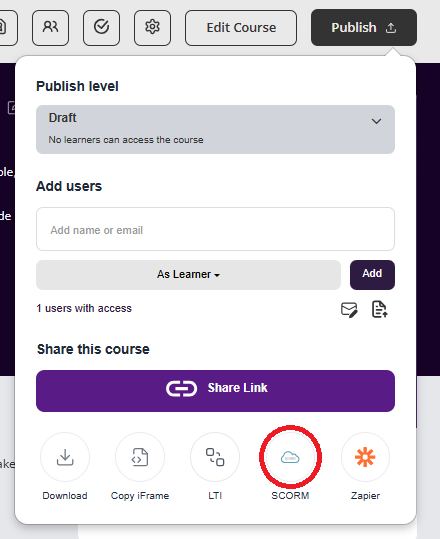
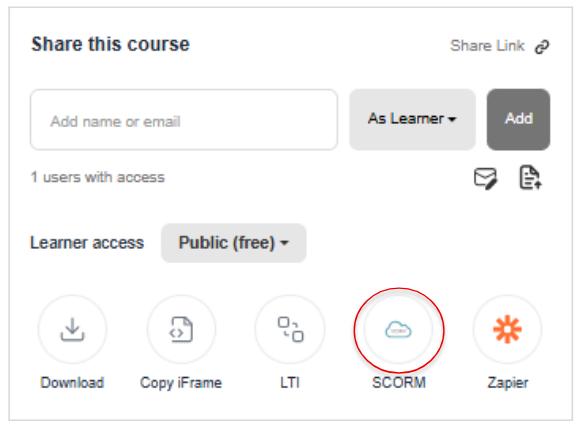
Note that this requires a published live sync to the course to take advantage of the AI and related live features.
Upload to Your LMS
Each LMS has slightly different steps for uploading SCORM packages.
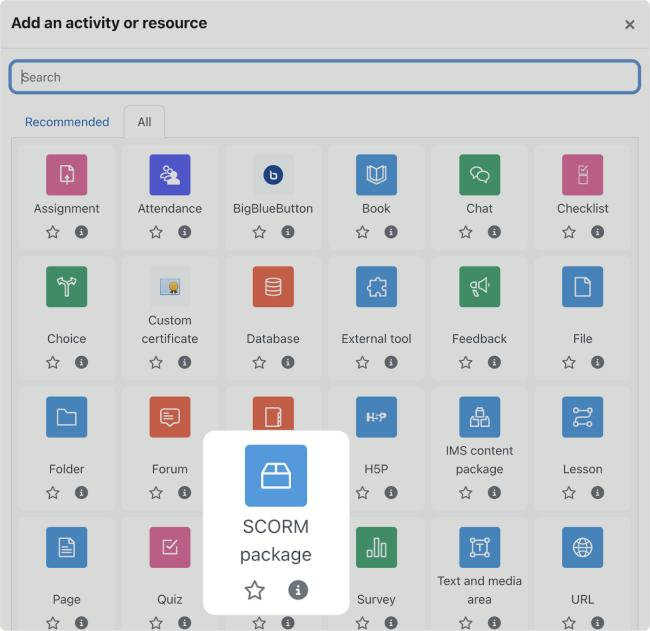
Always follow the official documentation for your platform to ensure compatibility.
Was this article helpful?
That’s Great!
Thank you for your feedback
Sorry! We couldn't be helpful
Thank you for your feedback
Feedback sent
We appreciate your effort and will try to fix the article